I drafted this review with Claude, which these days is the tool I reach for first. That's a bias, and you should know about it before you read my verdict on a competitor. The recordings, the tests and the opinions are mine. The dates come from my own chat history, emails and receipts.
The Short Version
- Best at: answering a real question in plain language, and turning a half-formed idea into a first image you can hand to someone else.
- Worst at: holding a plan together across a long piece of writing.
- What I could test against 2024: images. I re-ran my own prompts — the results are below.
- What I've paid OpenAI: $20 for one month of Plus, and $5 in API credits. Plus costs $20 a month today.
I Came for the Pictures
Before I ever typed a question into ChatGPT, I was on a waiting list for pictures. On July 6, 2022, I signed up for OpenAI's DALL·E waitlist, and my invite arrived on August 11. That lines up with OpenAI's own rollout: on July 20 it announced it would invite a million people from the waitlist "over the coming weeks." [1]
The pictures I remember making that year, though, came from Discord. I believe it was Midjourney, which in those days ran inside Discord rather than on a website. [2] I still have some of them saved, but nothing that proves which tool made them. I think I signed up, used the credits and canceled. Honestly, I can't remember for sure, and I can't find a single receipt.
I wanted to see how it worked. How detailed could it get? Is it really creating its own images, or is it just Frankensteining existing ones? The results were clean and polished, and then a third arm would appear for no reason. Hands swung between four fingers and seven. Earrings melted into jawlines. It didn't understand hats; it thought they were part of the person.
I wasn't completely blown away. I didn't think it would replace the masterpieces in museums. But I was testing it for a specific reason, and it's the reason this whole review hangs on.
If you've ever tried to get an image out of an artist or an agency, you know the problem. You're describing a feeling. You have a picture in your head and no words for it, and they have to interpret whatever you manage to say. That back-and-forth can take hours, days, weeks, months — and you can end up with something you're just so tired of trying to explain that you settle for whatever looks decent.
My question was whether a machine could shorten that gap. Type the idea in, get something close, then hand it to an artist: this is close to what I want — can you make it now?
Nine Days After Launch
When I started this review, I thought my first ChatGPT conversation was in March 2023. Then I found an older account, one I'd opened just for ChatGPT on December 9, 2022, nine days after OpenAI released it. [3] I didn't use it much, but its first conversation is from that same evening, at 5:37, and it's the oldest in any of my accounts.
The first day was for general questions. I asked what it could tell me about Will Wight, the author. It said it was not "able to provide information about specific individuals," because it was "a large language model trained by OpenAI" with no access to the internet. I asked for a new title for one of his books: no, it couldn't create new content. I asked for a paragraph written as if from one of his books: no, it didn't have "the ability to create original content."
OpenAI's own launch post admitted both habits: the more cautiously the model was trained, the more often it declined questions it could have answered, and it overused certain phrases, "such as restating that it's a language model trained by OpenAI." [3]
Then I asked for a list of reasons phone assistants don't work, except I typed assistance, and it gave me five reasons a phone help line might let you down: busy lines, not enough staff, limited hours. When I named Siri and Google Assistant, it answered the question I meant: five reasons they don't work well as personal assistants.
You can see why I wasn't very impressed by AI back then. The exception is further down the same conversation, dated March 27, 2023. I gave it two sentences written in the passive voice and asked for them in the active. Can be found became you can find. That impressed me.
In May 2023 I was still testing what it knew and what it could explain: three reasons to work with a great salesman, three reasons to choose one salesman over another, a paragraph of sales copy.
Google, With a Little Bit of Seasoning
The answers that won me over came on a different personal account. Its first conversation is from March 23, 2023, at 10:22 in the morning — a work question. When I first recorded my notes for this review, I remembered that conversation as one of the moments it blew my mind. When I went back and read it again, it was a good definition. Useful. Not mind-blowing.
The one that got me came a month later, on April 21, 2023. I asked it to write HTML to overlay text on an image, and it came back with CSS that centered it: move the text 50% from the top and 50% from the left, then transform: translate(-50%, -50%). I already knew about transform and translate. I'd just never tied them together. That was mind-blowing. It gave me a good answer, a usable one, and I put it in my toolkit.
Even then, I didn't really understand what it was. I thought it was retrieving pages and rearranging the sentences — Google with a little bit of seasoning. But it made things so much easier. Before, I'd type a question into Google, ignore the top results because most of the time that's garbage, and dig through forums that pointed at other forums. Some of those forums didn't exist anymore. Some linked somewhere else, and in the back of my mind I was always wondering whether some hacker had put that link there to do something malicious when I clicked it.
With ChatGPT, it was like I'd already done all that searching and it just gave me the answer.
It didn't replace searching entirely. If I don't even know the question I'm supposed to ask, I don't even know what to say — so I'd still follow my own loose breadcrumb trail. If anything, ChatGPT kind of took me to a place where it helped me find my question.
What I Actually Used It For
Mostly images, and mostly for work — so most of what I made isn't mine to show. The test images further down contain nothing about my employer. They were tests of what the tool could do, and until now nobody but me had seen them.
Here's how I used it. When I needed an image for a video or a web page and didn't know what I wanted, I'd ask ChatGPT to try something, watch the little previews flicker through while it worked, then take the result to a colleague in marketing: can you make something like this? And they would.
It beat the alternatives. With the stock photo libraries I used, you couldn't really cast a person — each model had maybe one or two photos, so you couldn't get attached to a face. You'd find a type — a guy with a beard, a woman in a dress with black hair — and take whatever was available.
And it fixed the order I was spending money in. If you pay for the artwork first and then present it, you hear that's good, but can we change this — and you've already paid for it. Then comes another version, and another, and at the end somebody asks why the project cost so much. A generated image didn't need to be perfect. It just needed to be a placeholder that gave a good example of what we were looking for. If it passed muster, then we could go buy the images we wanted. I can give that eureka moment a date: May 9, 2024.
The best thing it ever did for me came later, on the front end. On April 9, 2025, it helped me finally build a search bar I'd been trying to nail down forever. That was my greatest day with it — I wanted to break out and tap dance.
It walked me through Outlook's conditional comments — the if mso tags — which I personally dislike. Not because they don't work; obviously they do. It's because back in high school I had to build a whole second web page just so one particular case would display correctly. And it solved a problem I'd had for years: you can keep buying books all day long, but it doesn't make a difference if they keep changing them. I built a whole site on Bootstrap, and Bootstrap keeps coming out with new versions.
The Re-Test: My Own 2024 Prompts, Run Again
When I recorded my notes, I said that back then it "could not do words" — and then, in the same breath, that it would get most of the word right and then just kind of lose cohesion, like hieroglyphs based on the American alphabet.
The fair way to find out what's changed is to paste the same prompts back in. So I dug three out of my 2024 history and ran them again on September 26, 2026, word for word, typos included. Two I can show you. The third was for work, so I'll describe it.
I ran them on the same company-paid work account I'd used in 2024, so these are paid-plan results, not the free tier's "limited and slower image generation." [4]
Test 1 — The rat chess player shown
“Create image of half man, half white rat, wearing a top hat playing chess. Photo-realistic.”
This was before I'd learned the importance of prompting. When I recorded my notes, I called what I'd asked for basically a were-rat. It couldn't understand what I was saying, and the result was pretty terrifying. That makes it a better test, not a worse one — I pasted the same naive prompt back in. In 2024 that prompt gave me two images, so both are here.
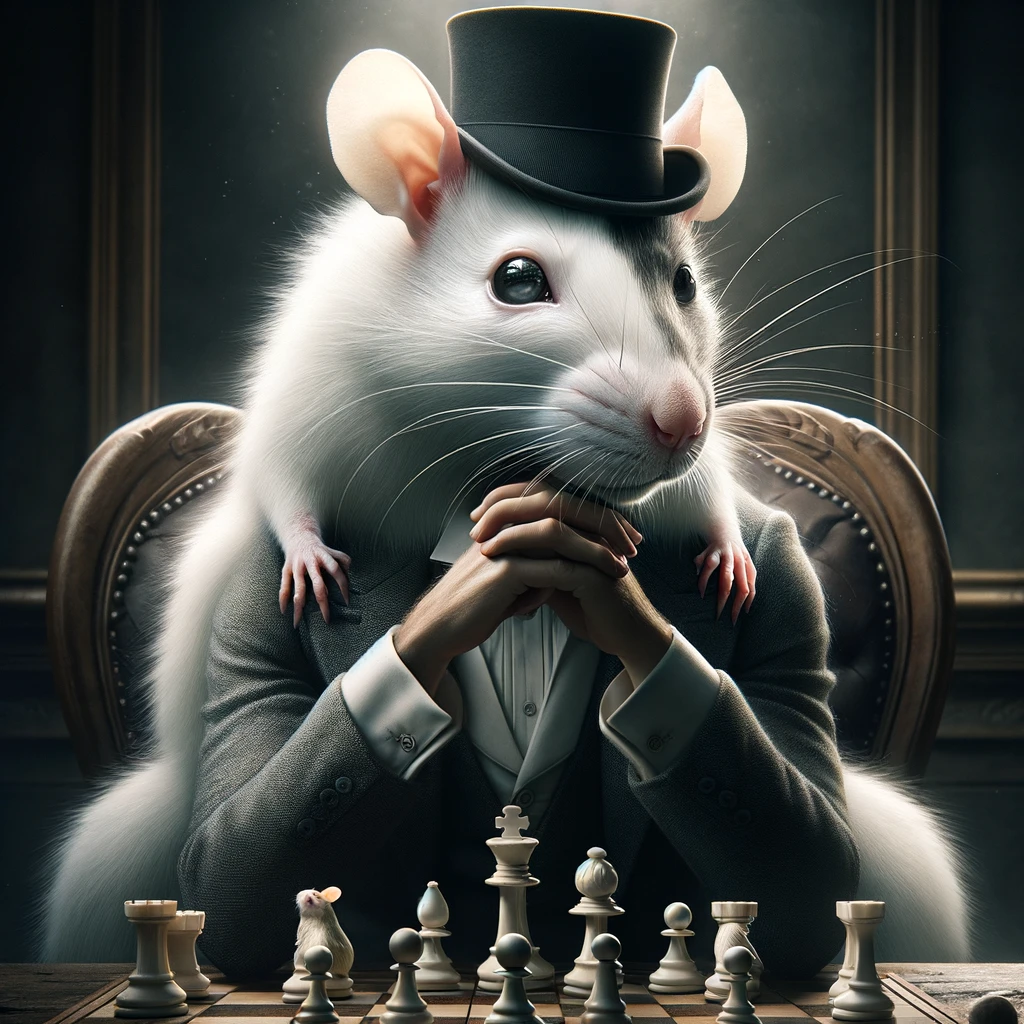
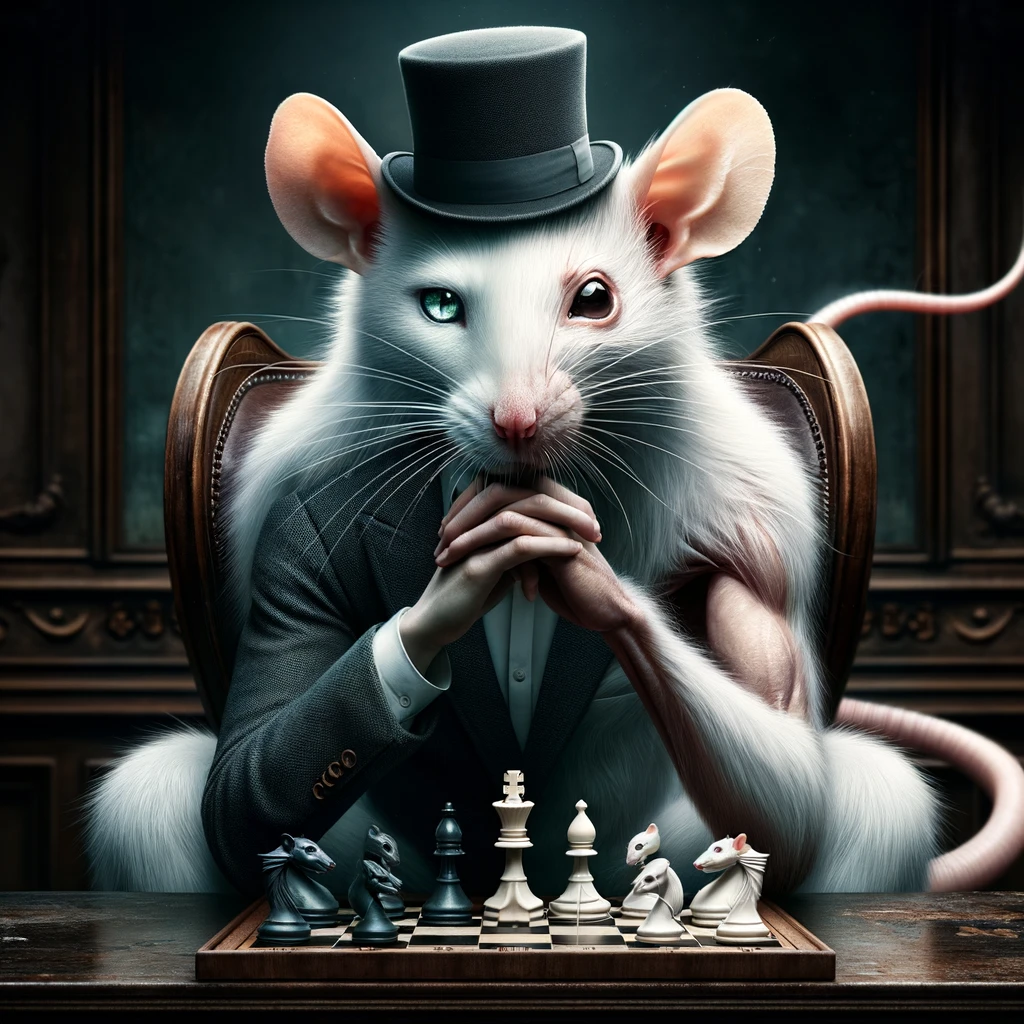
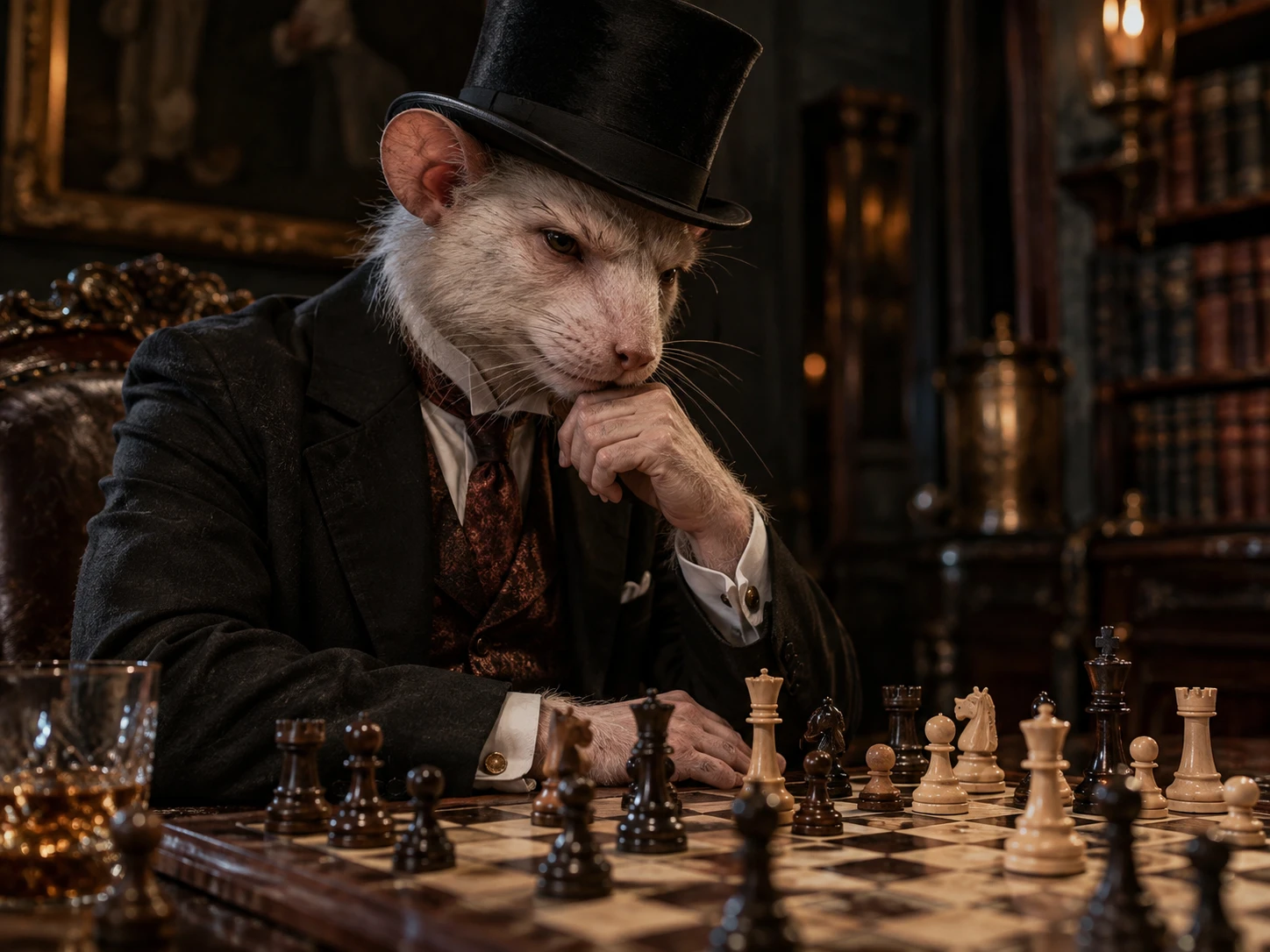
| March 22, 2024 — image 1 | March 22, 2024 — image 2 | September 26, 2026 | |
|---|---|---|---|
| One creature? | No — a rat sitting on a man, so four hands: human hands under the chin, rat paws on the shoulders | Closer — one rat head on one body, but the arms don't match: one in a suit sleeve, one bare and muscled. The eyes don't match either: one green, one black | Yes — one creature with two hands, both carrying the same white fur as the head |
| The tail | Long and fluffy, more fox than rat | A pink rat's tail | Out of the shot, so untested |
| The board | A small rat figurine standing among the pieces, and no knight I can find | Knights with rat heads, on both sides | No rat on the board, and ordinary knights on both sides |
| Realism | Convincing fur, whiskers and light | Convincing fur and whiskers, in a dark, painted-looking room | A whole scene — a library, lamplight, a crystal tumbler — and he looks like he's working out a move |
Test 2 — The desk shown
“The background image of an office, top-down, focused on the desk realistically, with a marketing design. Perspective is from behind the desk.”
This one is from May 9, 2024 — the day of that eureka moment.
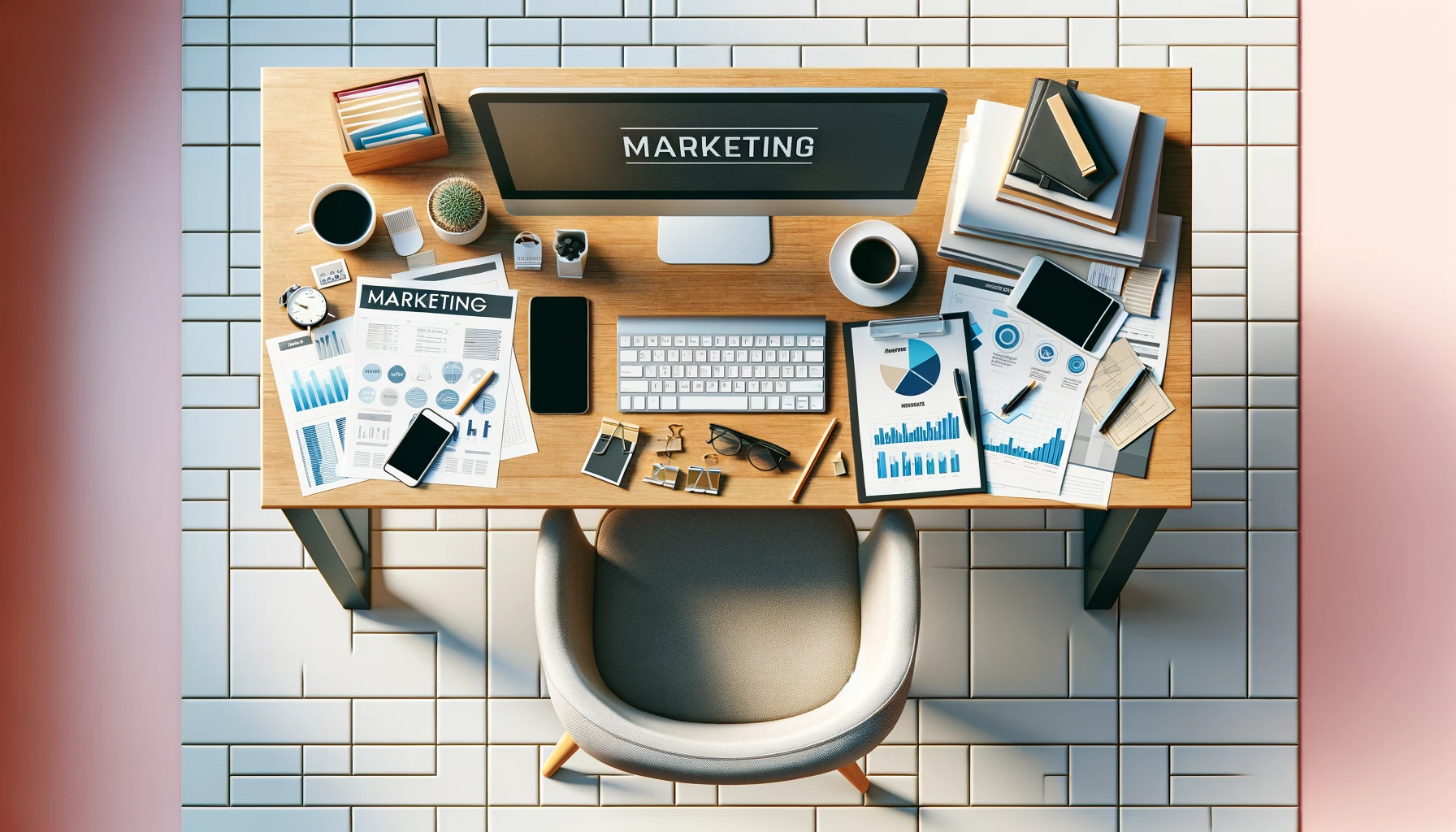

| May 9, 2024 | September 26, 2026 | |
|---|---|---|
| Headline text | "MARKETING," spelled correctly, twice | No lettering beyond a tiny laptop badge and a blurred book spine |
| Small print | Not words — "MINRRATS" under a pie chart | Nothing to judge |
| Perspective | Three viewpoints at once: the desk from above, the monitor face-on, and the desk and chair legs showing | One consistent angle |
| "A marketing design" | The word MARKETING written on things | A clean website background, with the right half left empty — exactly where a headline would sit |
| "Realistically" | A polished render | Photographic: window light, wood grain, latte art |
The perspective row is the one I'd point to. My prompt asked for two viewpoints at once — top-down, and from behind the desk. In 2024 it drew both and the picture broke. This time it picked one angle that satisfies both and held it.
The text row is fair to 2024: it could spell a headline. It couldn't do the small print. This time it put nothing on the desk worth judging — just that tiny laptop badge — so this pair doesn't settle lettering. The next one does.
Those desk images are also where I spent ages trying to get a desk without a chair. I typed "no chair" and got a new desk with a chair. I asked for a larger desk without a chair and got a larger desk with a chair. Eventually I gave up. Fine — let's put somebody in the chair, since you're going to force me to have a chair. And that's when I realized I could use these. That was the eureka moment.
Test 3 — A symbol for our company reported
This one was for work, and the images carry my employer's name, so you'll have to take my word for it.
It starts before ChatGPT could draw anything for me. On March 19, 2024, on that older account, I asked it to make a symbol for our company. It wrote me a description of one. When I asked to see samples, it said: "As a text-based AI, I'm unable to directly create visual images." When I told it to create the symbol, it offered ASCII art: a row of five boxes drawn with underscores and pipes. Asked again for a simple design, it typed out our initials with a few lines hanging under them. It couldn't be used as is. I never paid for that account, and in March 2024 drawing inside ChatGPT was for paying customers only. [5] [6]
That was my experience of ChatGPT and pictures, which is part of why I was so surprised when a coworker told me it was good at images. It was so bad I'd forgotten it by the time I started this review.
Two months later, in a new chat on the work account, I asked it to draw the symbol from the description it had written for me in March. The first try that day put an X — the sign for "no" — right where its own check mark was supposed to be. I rewrote the brief. The second attempt wrote our company name around the edge, which I hadn't asked for, and misspelled it. Then it added a second ring of letters that weren't a word at all.
On September 26, the same brief came back clean: everything I'd asked for, including the check mark, in the right colors, and no words I hadn't asked for. I ran it twice and got nearly the same symbol both times. Then I added one line asking for the company name, and it spelled it letter for letter.
It still isn't our style. But at least it spelled our company name right.
Why it changed
On March 25, 2025, OpenAI replaced DALL·E as ChatGPT's default image generator with image generation built into GPT-4o, and pitched it on exactly the things my 2024 images got wrong: it "excels at accurately rendering text, precisely following prompts…" [7] OpenAI has kept updating it since. The newest version, ChatGPT Images 2.5, started rolling out to every ChatGPT user on September 8, 2026, eighteen days before my re-test. [8]
These are three of my own prompts, not a benchmark, and about two and a half years made the difference.
The Week It Wrote Me a Different Book
In December 2022, ChatGPT told me it didn't have the ability to write a paragraph from a book. On Sunday, August 3, 2025, I started a long story with it, probably the longest I've ever sat with it in one go, and I kept that conversation going on and off for the next week. I gave it a premise and asked for an outline first. It came back with thirty chapters in three acts.
It kept to that plan for three chapters. Then it offered a flashback chapter between three and four, and I said yes — and when I asked for Chapter 4, it wrote a different Chapter 4 from the one it had planned. Chapter 5 wasn't the planned one either. By the time I stopped, the conversation ran to about 26,000 words, and the story had only reached Chapter 17 of the thirty.
I realized that if I didn't do anything but say keep writing, keep going, it would just keep going. It was meandering. It was changing the rules. It was more impressed with creating the words themselves than with what the words meant. It told me what I didn't want to write, I'll tell you that.
What it showed me is that it needs a skeleton. Give it a real constraint — a solid guardrail, an idea to chase, a person with the meat and the skeleton of the idea — and ChatGPT can help dress the skeleton. It can give you a diagnosis of the skeleton. It can tell you ideas based on what it knows about it. What it can't tell you is where the skeleton is going to go.
I think that's an adequate role designation: a commentator. You tell it what you did, or what you're thinking about doing, and it can commentate the shizzy out of it. It can tell you what people are probably going to get from what you've said. It is fantastic for that — and that right there is why I say bounce ideas off of it. Ask it what a good next step would be, and it'll tell you some people have gone this way and some have gone that way. Then you can do whatever you want to do.
It's not trying to judge whether the course that you've taken is the right choice or the best choice. It's just trying to help you make a choice. Any choice. Really, it doesn't really matter. It doesn't care. Why would it? Right? Once you make a choice, it's done its job.
From my recorded notesThat's one mistake I made with ChatGPT: I did not set rules. I did not put them down on paper. I could have just made a file and kept uploading it every time.
The Line-Up
Claude is where I do most of my work now. The difference is hard to put into words, but here's my best go. ChatGPT will do what you ask, but it hardly recommends anything. Not to say that's a bad thing — if you ask it how to do something, it'll give you options. But if you tell it this is what I want you to do, it'll just do that. Claude will say: we can do that — but what are you trying to accomplish? Maybe I can find a better way. And if you push, it'll stop asking and do exactly what you asked. For getting work done on web pages, that was way better. ChatGPT answered my questions; it just didn't give me as good results.
I haven't left ChatGPT, exactly. I still use OpenAI's models through the API, on a $5 credit I bought in March — and six months later, $2.36 of it is still there. I use it to generate images. And a coworker of mine uses ChatGPT regularly, alongside Canva — they've become staples.
Gemini is very good, just not better than ChatGPT as an all-around tool. For coding, I'd pick it, or Claude, first. And to be honest, all the good use history ChatGPT has earned gives it better mental recognition than Gemini. Gemini had a rough patch at the start, and Google as a company rubs me the wrong way with the way it uses our data and drops tools I became reliant on. It still does. So it doesn't get much positive headspace from me, and I just can't get behind its products much. That's for sure just a me thing. (For the record: this site runs Google's ad code and depends on Google Search. Weigh my opinion of Google with that in mind.)
What It Cost Me
When I first recorded my notes for this review, I said I'd paid for it yearly for the first three years. Then I went looking for the receipts. The personal account I used most has one line in its billing history: $20, on December 13, 2024. I canceled on the 31st. Free before that, free since. The older account has never cost me anything.
I couldn't even find that personal account at first. I'd signed up with an email alias — the kind where you add +something to your address — so my main inbox showed nothing. I found it by following the money: searching for the invoices.
The API is billed separately, and I pay for that myself too: $5 in credits on March 18, 2026 — the only charge on that account so far. As of September 26, $2.36 of it is left. Six months of API use has cost me $2.64.
(At work there's a separate, company-paid account. That isn't my money, so it isn't in these figures.)
- Free — unlimited everyday text chats, with limited and slower image generation
- Go — $8 a month in the US [10]
- Plus — $20 a month, billed monthly; there's no annual plan
- Pro — $100 or $200 a month (new sign-ups and upgrades to the $200 tier have been temporarily paused since September 10, 2026)
- The API is billed separately.
Who It's For
- You need a real answer to a real question, in plain language, fast. Yes.
- You need to get an idea out of your head and in front of someone else — a rough image to hand to a designer, a placeholder to get sign-off on. Yes, and it has improved a lot.
- You want it to hold your plan across a long piece of writing. Not in my experience. Give it the skeleton yourself.
- Code is your main focus. It's good at the basics — it helped me build my first search bar — but I'd pick Claude or Gemini.
- You need it to be right every time. Nothing is. Check it.
Would I recommend it? When I recorded my notes, I said yes — "100%. Like 120%." I still do, as long as it's the commentator and not the driver. If coding is your focus, I wouldn't. It's good at coding from a baseline point of view, but I've found other AI agents that are better at it, and in my opinion Claude and Gemini are the better options there. As an all-around agent, though, it's a solid recommendation for images, questions and ideas. Very good.
Before You Start
- Don't run everything through one giant thread. I kept one conversation for everything, and realized too late it was a powder keg of tokens — every message was hauling thousands of tokens of old conversation along with it.
- Write your rules down, and give them to it at the start.
- Check it. Always.
If it's always advancing, always developing, the version of it now is not going to be a version of it next year. Hell, next month.
From my recorded notesIt's not like it does every certain thing wrong. You just never know. If you're ever curious, ask it yourself: can I trust everything you tell me? It'll tell you no. What does that tell you?
I used to wonder about it. Could someone just tell it to create a website about something and start making money from the ads? Were all the years I'd spent making websites wasted? No — we're fine. Can I make a website with it? You betcha. But will the content be anything anyone wants to read? I'll leave that up to everyone else. For me personally, no.
It's like the farmer in the horse-and-buggy days who hears the horse can do it for him. So he loads up the wagon, looks at the horse and says: go to market and sell my stuff for me. And the horse wanders over and starts eating the grass.
That's similar, but not the same. The better version is an assistant riding along with you — warning you about the potholes, telling you the market has issues, telling you this weekend may be a bad idea because there's a big festival on, or maybe a great idea because there's a big festival on. Reminding you what you sold the goods for last week, and helping you find your way back. What doesn't work is handing it the reins so it can do everything for you.
It's a fantastic tool. Fantastic. Check its work. Check it before you publish it.
Try ChatGPT →